Removing an Open Pay Run
- Click on the Process tab.
- Find the line that shows the open pay run you want to remove.
- Move your mouse over that line (hover, don't click yet). A red Remove button will appear on the right side of the line.
- Click the red Remove button.
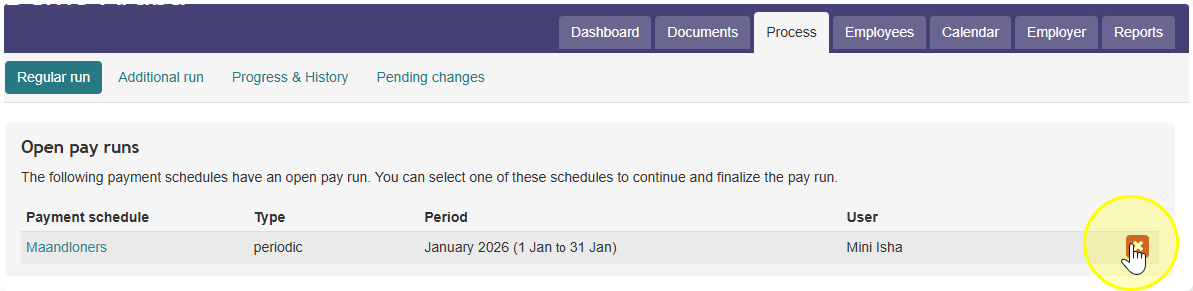
Note: You can only remove a pay run if you are the person who created it. If you don't see the "Remove" button, it may be because someone else generated this pay run.
Use this when an open pay run was created by a colleague, so you can’t remove it yourself. Setting every employee to “Process later” leaves nothing to process, and the run disappears
Steps
- Go to Process and open the pay run.
- Open the Check tab.
- Select the first employee in the run.
- Click the dropdown arrow next to the Approve button (top right), then choose Process later for this employee.
- Repeat steps 3 and 4 for every employee in the run. Don’t use “Approve all,” because that would process the run instead.
- When the last employee is set to “Process later,” the run is gone.
Before you start
- The pay period isn’t skipped. Each employee’s pay for this period is picked up again in the next payroll run. Make sure that’s what you want.
- Don’t confuse it with “Process as nil.” That option tells Celery the employee gets no pay for this period at all, and it won’t come back in a later run.
- Lots of employees? Doing this one by one can take a while. It may be quicker to ask the colleague who created the run to remove it, or to take the run over through Account → Users.