Where do I enter the CRIB number for employer and employees? (EN)
The CRIB number is mandatory for both the employer and all employees. Each employee has their own unique CRIB number that differs from the employer's CRIB number.
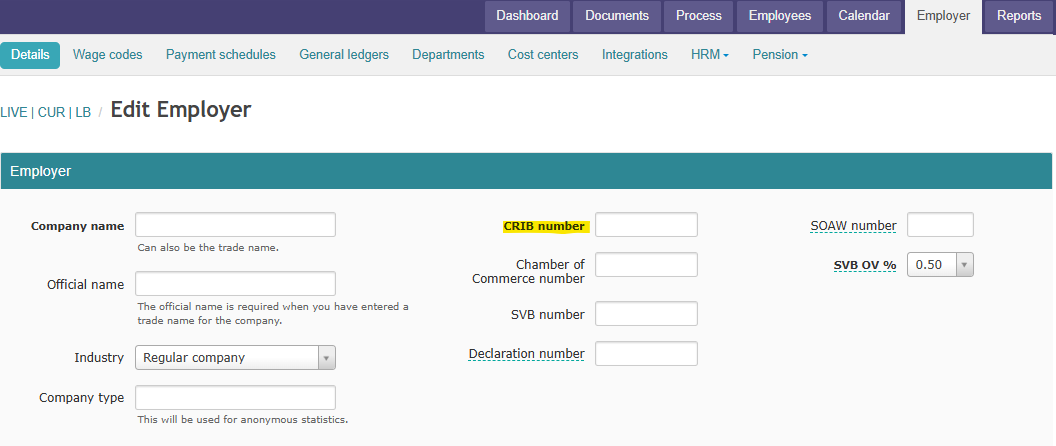
Enter employer CRIB number:
- Go to Employer (top menu)
- Click on the Details tab
- Enter the CRIB number in the CRIB number field
- Click Save
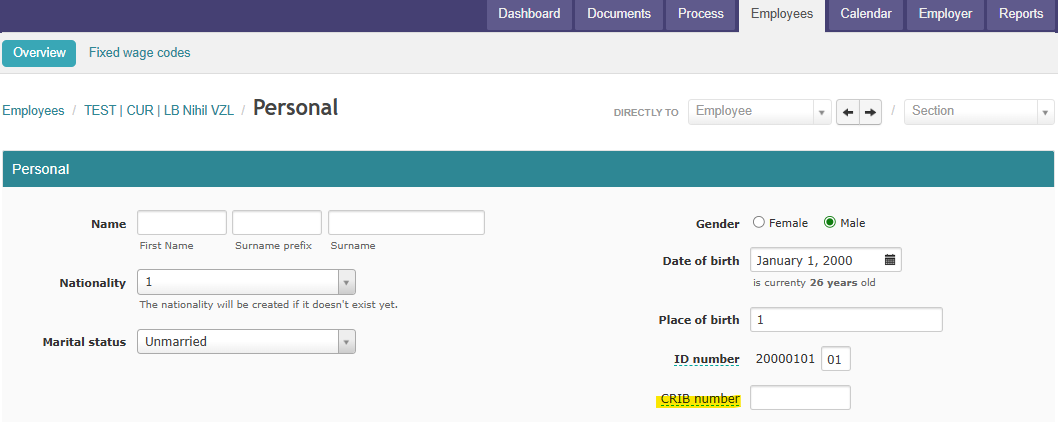
Enter employee CRIB number:
- Go to Employees (top menu)
- Select the relevant employee from the list
- Scroll to the Personal section
- Enter the CRIB number in the CRIB number field
- Click Save
Repeat steps 2 through 5 for each employee.
Check for missing CRIB numbers:
Use report C43 - Missing info to check which employees are missing a CRIB number:
- Go to Reports
- Search for report C43 - Missing info
- Click Apply
- The report shows which employees have missing information, including CRIB numbers
Important:
- Without CRIB numbers you cannot generate the annual summary wage sheet (VZL)
- Each CRIB number is unique per person/company
- Always check the C43 report before generating the VZL