Round Net Pay to Whole Numbers
- Go to the employee's profile.
- Click Salary.
- Find the Payment section.
- Look for the rounding option. Here you can choose how the net pay should be rounded.
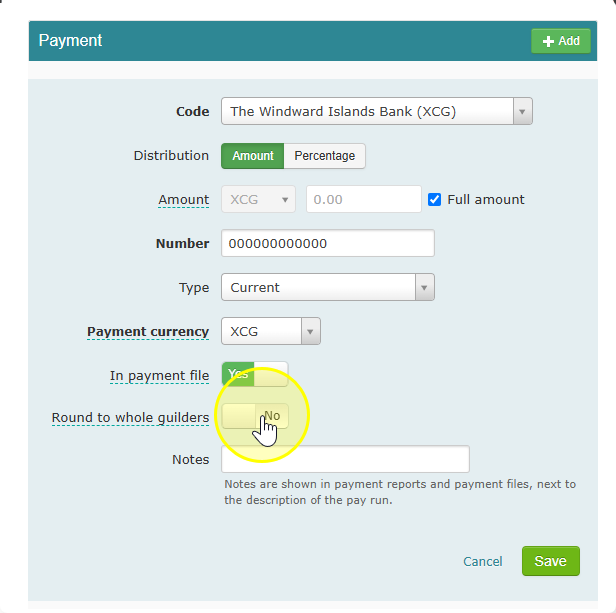
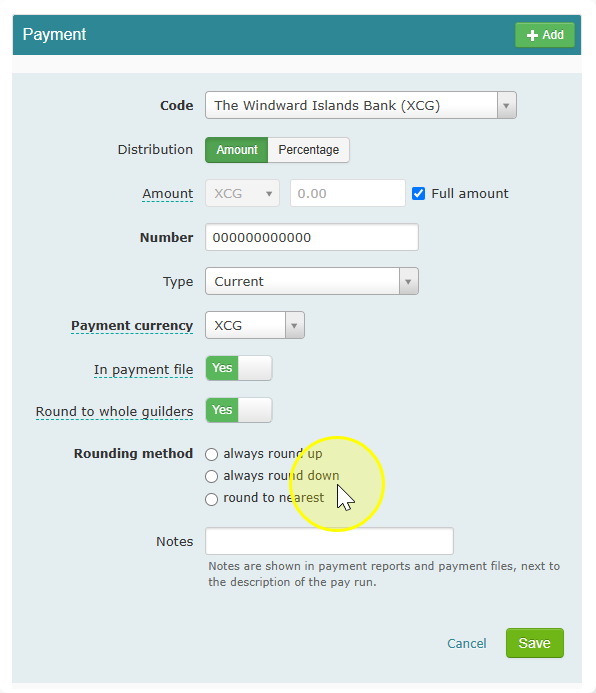
- Pick one of these three options:
- Always round up – the net pay is always rounded up to the next whole guilder or dollar.
- Always round down – the net pay is always rounded down to the nearest whole guilder or dollar.
- Round to nearest – the net pay is rounded up or down, whichever is closer.
Note: If you pick Round to nearest, the small differences created by rounding are tracked from period to period. This tracked difference is paid out or deducted the next time you process payroll. Over the year, this tracked amount can go up or down, depending on how the rounding falls each time.