How can I change the percentage for the Extra Earnings tax table?
The percentage for the Extra Earnings tax table depends on the employee’s annual wage. You can find this amount under Employees - Salary.
How Celery works out the annual wage:
- Existing employee: Celery uses the wage details from the previous year.
- New employee, or no previous year: Celery takes the wage per pay period and converts it to a yearly amount.
When you need to change it yourself:
Celery’s calculation doesn’t include extra payments, such as:
- taxed expense allowances
- vacation allowance
- 13th month pay
If the employee gets any of these, the annual wage may be too low. That means the percentage may be wrong.
How to fix it:
- Go to Employees - Salary
- Tick the box next to the annual wage. This lets you edit the amount.
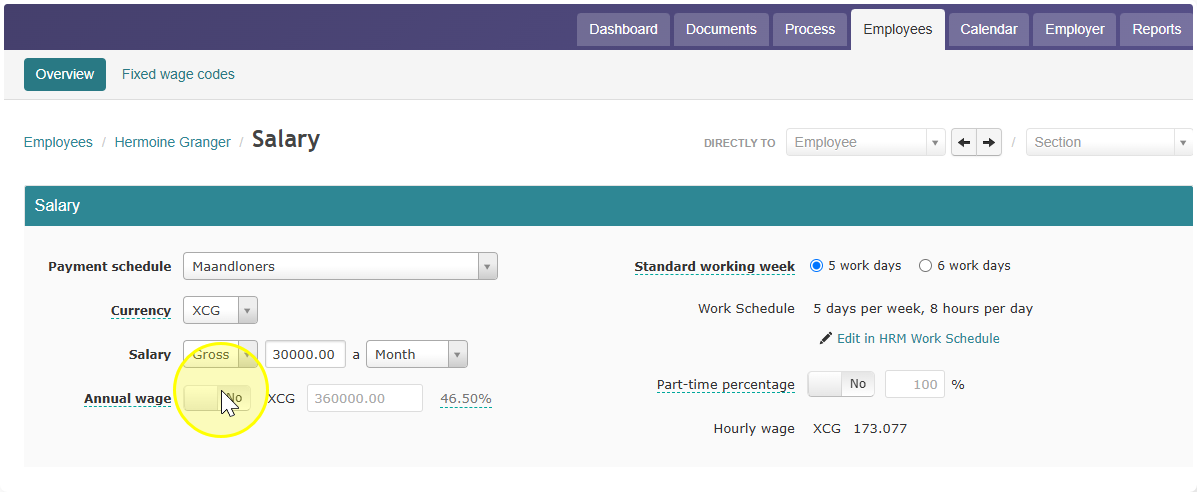
- Enter the correct annual wage, including the extra payments.
- Save your changes.
Celery will now use the correct percentage for the Extra Earnings tax table.