The SVB ZV premium is ticked, but it doesn’t show on the payslip. How do I add it to the wage calculation?
The ZV premium (the sickness insurance premium paid to the SVB, the Social Insurance Bank) only applies when both of these are true:
- The employee’s SVB wage is below the SVB wage limit.
- The employee works 5 or 6 days a week.
Why it’s missing: Ticking the premium isn’t enough on its own. If the employee’s number of workdays isn’t set to 5 or 6, the premium won’t be calculated.
How to fix it:
- Open the employee’s details.
- Go to Salary.
- Set the number of workdays to 5 or 6.
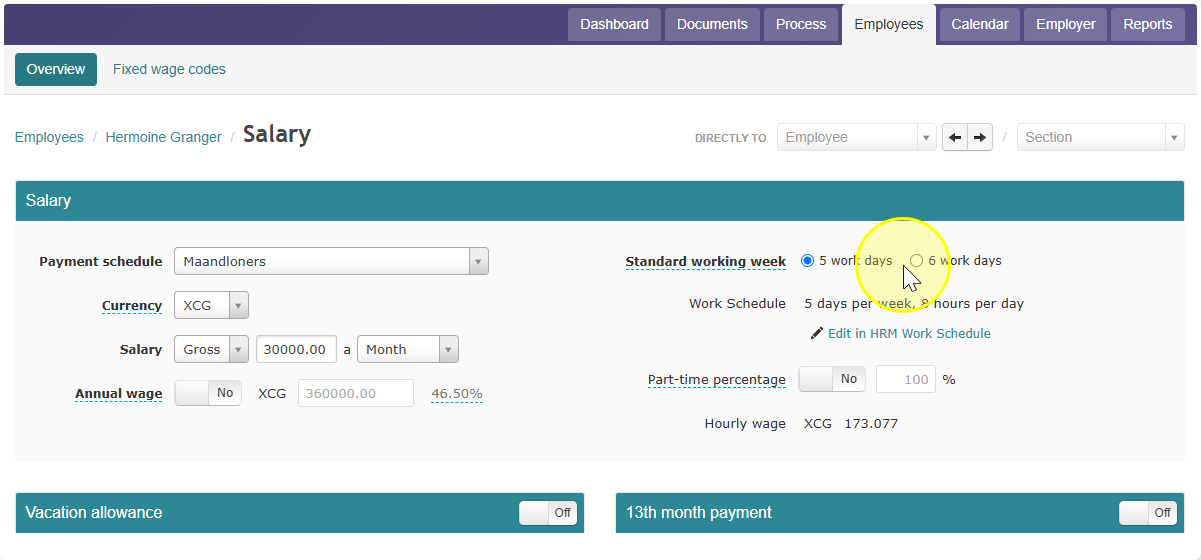
- Run the wage calculation again.
The ZV premium will now appear on the payslip.